Showing posts with label Excel. Show all posts

Wednesday, November 29, 2023

Pandas for data extraction, merging DataFrames, Python for AutoCAD


I explored Groupby and Aggregate here

import traceback
import pandas as pd
from pyrx import Ap, Ax, Db, Ed, Ge, Gi
 
@Ap.Command()
def PyRxCmd_doit():
    try:
        #setup dictionaries to hold our data
        lineMap = {"Type": [], "Layer": [], "Length": [], "QTY": []}
        circleMap = {"Type": [], "Layer": [], "Diameter": [], "QTY": []}

        #current database
        db = Db.curDb()
        model = Db.BlockTableRecord(db.modelSpaceId())

        #search model for all lines (derived from)
        lineIds = model.objectIds(Db.Line.desc())
        for id in lineIds:
            line = Db.Line(id)
            lineMap["Type"].append("Line")
            lineMap["Layer"].append(line.layer())
            lineMap["Length"].append(line.startPoint().distanceTo(line.endPoint()))
            lineMap["QTY"].append(1)

        #search model for all circles (derived from)
        circleIds = model.objectIds(Db.Circle.desc())
        for id in circleIds:
            circle = Db.Circle(id)
            circleMap["Type"].append("Circle")
            circleMap["Layer"].append(circle.layer())
            circleMap["Diameter"].append(circle.diameter())
            circleMap["QTY"].append(1)

        #create the DataFrames
        lfd = pd.DataFrame(lineMap)
        cfd = pd.DataFrame(circleMap)

        # called before concat because the column names are different
        # groupby & aggregate
        lfd = (lfd.groupby(["Type", "Layer", "Length"],
                        sort=False, as_index=False).agg({"QTY": "sum"}))

        # groupby & aggregate
        cfd = (cfd.groupby(["Type", "Layer", "Diameter"],
                        sort=False, as_index=False).agg({"QTY": "sum"}))


        # concat the DataFrames
        result = pd.concat([lfd, cfd])

        # write to excel, but don't write the index
        with pd.ExcelWriter("e:\\pandas_to_excel.xlsx") as writer:
            result.to_excel(writer, sheet_name="sheet1", index=False)

    except Exception as err:
        traceback.print_exception(err)


Sunday, November 5, 2023

AutoCAD, Python, Pandas and excel

 This is a revision from my last post on pandas. This revised code will write the contents to Excel instead of of the command line. The data could be then imported as a datalink


import PyRx as Rx
import PyGe as Ge
import PyGi as Gi
import PyDb as Db
import PyAp as Ap
import PyEd as Ed
import traceback
 
import pandas as pd

#openpyxl or xlsxwriter
 
#get the attribues and return them as a list
def getAttValues(ref: Db.BlockReference)->list[str]:
    v = [ref.getBlockName()]
    for attrefid in ref.attributeIds():
        attref = Db.AttributeReference(attrefid)
        match attref.tag():
            case 'PART#':
                v.append(attref.textString())
            case 'DESCRIPTION':
                v.append(attref.textString())
            case _:
                pass
    return v
 
def PyRxCmd_doit():
    try:
        db = Db.curDb()
 
        #define our columns
        data = {'Name': [],
                'PART#': [],
                'DESCRIPTION': [],
                'QTY': []}
 
        #search for blocks that start with 'SPK'
        bt = Db.BlockTable(db.blockTableId())
        spkIds = [id for (n, id) in bt.toDict().items() if n.startswith('SPK')]
 
        for id in spkIds:
            btr = Db.BlockTableRecord(id)
            for refid in btr.getBlockReferenceIds():
                ref = Db.BlockReference(refid)
                values = getAttValues(ref)
               
                #pandas wants equal length lists
                if len(values) != 3:
                    continue
               
                data['Name'].append(values[0].rstrip('.dwg'))
                data['PART#'].append(values[1])
                data['DESCRIPTION'].append(values[2])
                data['QTY'].append(1) #we know we have one
 
        #create the dataframe, then group by
        df = pd.DataFrame(data)
        dfgr = df.groupby(['Name', 'PART#', 'DESCRIPTION'],
                         sort=False, as_index=False).agg({'QTY': 'sum'})
       
        with pd.ExcelWriter('e:\\pandas_to_excel.xlsx') as writer:
            dfgr.to_excel(writer, sheet_name='sheet1')
 
    except Exception as err:
        traceback.print_exception(err)


Tuesday, October 17, 2023

Python + AutoCAD, Extract to Excel


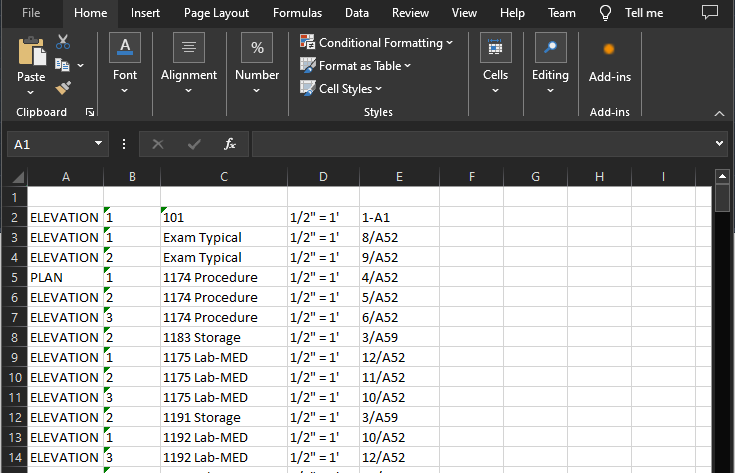
Here’s a sample extracting attributes from multiple drawings. I use ObjectDBX to open each drawing and collect the attributes from a block named ‘elev’, a block that holds room numbers etc., Openpyxl makes it incredibly easy to write to and excel file. I think the question, “How do I write to excel” is one of the most frequently ask in the CAD forums. In python it’s a breeze  

import PyRx as Rx
import PyGe as Ge
import PyGi as Gi
import PyDb as Db
import PyAp as Ap
import PyEd as Ed
import traceback

import AxApp24 as Ax
import AxAppUtils24 as AxUt

import openpyxl as Ex  # using openpyxl

def PyRxCmd_dbxextract():
    try:
        paths = ["e:\\06457Submittal.dwg",
                 "e:\\06457Submittal2.dwg",
                 "e:\\06457Submittal3.dwg"]

        wb = Ex.Workbook()
        ws = wb.active
       
        nrow = 1
        axDoc = Ax.getDbx()
        for dwg in paths:
            axDoc.Open(dwg, None)
            for ent in axDoc.ModelSpace:
                if ent.EntityName != 'AcDbBlockReference':
                    continue
                #cast
                ref = Ax.IAcadBlockReference(ent)
                if ref.Name != 'elev':
                    continue
                nrow += 1
                for ncol, att in enumerate(ref.GetAttributes()):
                    ws.cell(row=nrow, column=ncol+1, value=att.TextString)

        wb.save('e://ItsAlive2.xlsx')
    except Exception as err:
        traceback.print_exception(err)


Using DuckDB for expressions.

  After writing the last post, I was wondering if I could use DuckDB to query AutoCAD data, I.e. Layers   from pyrx import Ap , Db , Ed...